Skills versus hooks
Claude broke my local build twice, the same way. The second time, I learned the difference between a skill and a hook.
On our .NET Framework project, a modern dotnet build skips the step that embeds the EDMX. The build reports success, the data layer is built without its model metadata, and nothing complains until the app runs. The first time, it took me a while to find.
After that, I added the instruction to CLAUDE.md. Never run dotnet build on the net48 project. Claude followed it, mostly, and then it didn't. An instruction in context is something the model weighs, and it weighs it correctly nearly every time. Nearly is fine for a naming convention. It isn't fine for the data model.
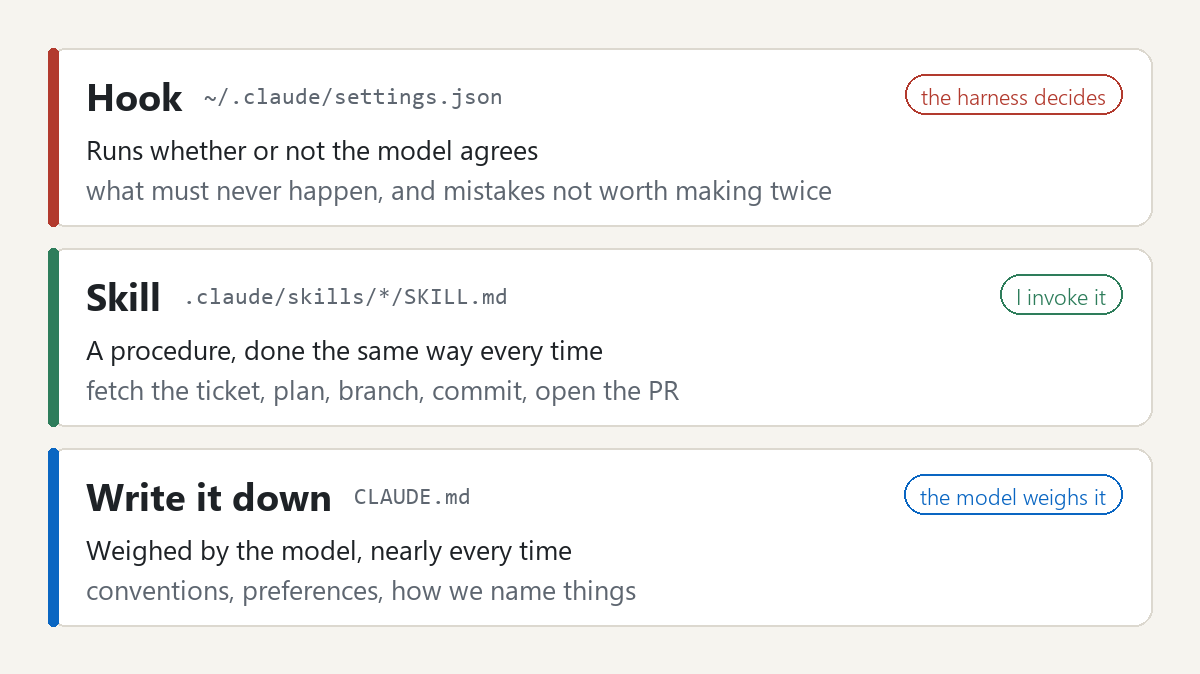
What I needed wasn't a better instruction. It was a hook, a script the harness runs before every shell command. It refuses the command whether or not the model agrees. The model never calls a hook and can't argue with one.
I've found a good hook is narrower than the rule it enforces. Mine fires only on the compile commands, and only when they're actually being run, so a search for the text "dotnet build" doesn't trip it. SDK-style projects pass through.
What matters most is what it says when it blocks. It explains why, gives the MSBuild command to run instead, and how to recover from a bad build. Claude reads that and corrects itself on the next turn. A bare refusal starts another round of guessing, and that churn can cost more than the mistake it prevented.
A hook is for what must never happen, and for mistakes not worth making twice. Five of mine refuse a command outright, among them the net48 build, a commit to a protected branch, a write into a gitignored test path, and a call to the wrong Azure DevOps account. Each one started as something that went wrong once. Four more act instead of blocking, an environment check at session start, an ESLint fix after every UI edit, a style reminder, and a notification when Claude stops or needs me.
A skill is for a procedure I want done the same way every time. Mine cover the ticket loop. Fetch the ticket, plan, branch into a worktree, then commit, log time, and open the pull request behind a review gate. There are dozens, each something I used to do by hand, slightly differently each time.
CLAUDE.md is for everything in between, the conventions, the preferences, how we name things. Those are weighed, not enforced, which is the right strength for them.
One placement detail. My hooks live in my user settings, not the project's. The project's .claude folder isn't committed, so a fresh worktree starts without it, and a guard that's missing from the worktree isn't a guard.
If it must never happen, hook it. If it must happen the same way, make it a skill. Otherwise, write it down and let the model weigh it.
Setting Up Claude, part 4 of 10. Next: CLI, MCP, or the browser.